Description: Show input image and h264 stream in the data folder. The page takes no args.
Id "image": original image
Id "video": h264 stream
Description: Convert image into stream and then convert the stream back to an image by extracting the first frame. The original image, the extracted image and the stream are shown on the page. The encoder parameters must be provided by URL parameters, i.e. after the ? sign in the URL combined with a & sign (see example below). If the data are found in the result folder, they are used instead of creating them again unless the recreate option is set.
Args:
Id "image": original image
Id "video": stream encoded as configured by the arguments
Id "extracted": extracted first frame of the stream
Example URL: streamCustom.php?bitrate=100k&codec=libx264&pixfmt=yuv420p
Example URL with screenshot upload: streamCustom.php?uploadScreenshot=1&bitrate=100k&codec=libx264&pixfmt=yuv420p
Example URL with screenshot upload and explicit video file: streamCustom.php?uploadScreenshot=1&fromVideoFile=video_color__h264_nvenc_yuv420p_pc_bt470bg_bt709_bt709_high444p.mp4
Example with custom image: streamCustom.php?bitrate=100k&codec=libx264&pixfmt=yuv420p&input=grayscale
Note: The custom reference image (png) must be in the data folder!
Example with NvEnc encoder: streamCustom.php?bitrate=100k&codec=h264_nvenc&pixfmt=yuv420p
Note: An Nvidia graphics card is needed on the host system and the host system must be Linux.
All encoded files can be downloaded here.
All uploaded screenshots can be downloaded here.
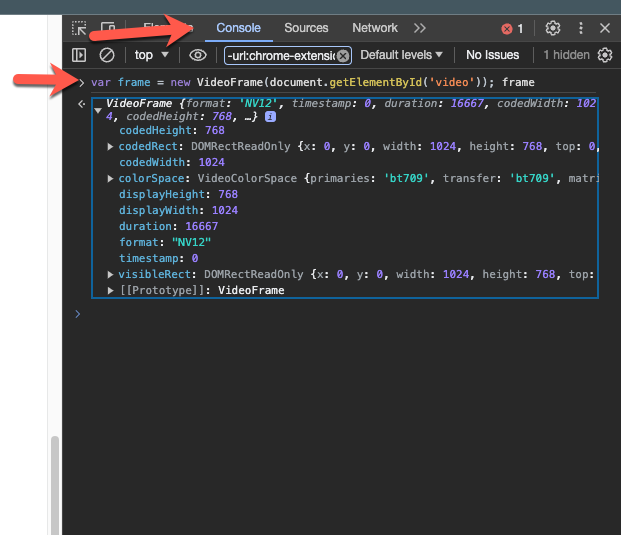
Right-click into the test page and choose Inspect. In the inspect window on the right side, open the Console tab and paste:
var frame = new VideoFrame(document.getElementById('video')); frame (Replace the element name, which is video in this example, depending on what you want to analyze.)